> ## Documentation Index
> Fetch the complete documentation index at: https://usemci.dev/llms.txt
> Use this file to discover all available pages before exploring further.
# Quickstart
> Get started with MCI
No installation needed! Run MCI directly using `uvx`
`bash curl -LsSf https://astral.sh/uv/install.sh | sh `
1. **Initialize a new project**:
```bash theme={null}
uvx mcix install
```
This creates `mci.json` with example tools and `mci/` directory with example toolsets.
2. **List your tools**:
```bash theme={null}
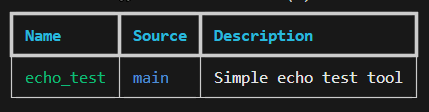
uvx mcix list
uvx mcix list --file copilot.mci.json
```
Example output:
 3. **Validate your configuration**:
```bash theme={null}
uvx mcix validate
```
4. **Run an MCP server**:
```bash theme={null}
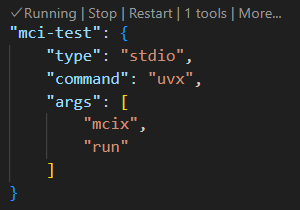
uvx mcix run
```
Example from VS Code:
3. **Validate your configuration**:
```bash theme={null}
uvx mcix validate
```
4. **Run an MCP server**:
```bash theme={null}
uvx mcix run
```
Example from VS Code:
 That's it! Your MCI tools are now available via the MCP protocol.
### Optional: Install MCI Globally
If you prefer to install MCI permanently:
```bash theme={null}
# Install globally with uv
uv tool install mcix
# Then use without uvx prefix
mcix install
mcix list
mcix run
```
Or install from source:
```bash theme={null}
git clone https://github.com/Model-Context-Interface/mci-uvx.git
cd mci-uvx
uv sync --all-extras
uv tool install --editable .
```
## Next Steps
Now that you have MCI set up, explore these core concepts:
Learn about all available MCI commands and their options.
Understand how to define and use tools in your MCI configuration.
Organize your tools into reusable toolsets.
Learn how MCI integrates with the Model Context Protocol.
That's it! Your MCI tools are now available via the MCP protocol.
### Optional: Install MCI Globally
If you prefer to install MCI permanently:
```bash theme={null}
# Install globally with uv
uv tool install mcix
# Then use without uvx prefix
mcix install
mcix list
mcix run
```
Or install from source:
```bash theme={null}
git clone https://github.com/Model-Context-Interface/mci-uvx.git
cd mci-uvx
uv sync --all-extras
uv tool install --editable .
```
## Next Steps
Now that you have MCI set up, explore these core concepts:
Learn about all available MCI commands and their options.
Understand how to define and use tools in your MCI configuration.
Organize your tools into reusable toolsets.
Learn how MCI integrates with the Model Context Protocol.